Explore
3D Model
Spin the estate around, move along Lorong Chencharu, and slide through the day to watch the shadows move. Tap a block to see its details.
Drag to move Ctrl + drag to rotate Scroll to zoom One finger drag to move Two finger twist, or swipe up and down, to rotate Pinch to zoom
Enter full screen mode to interact with the model
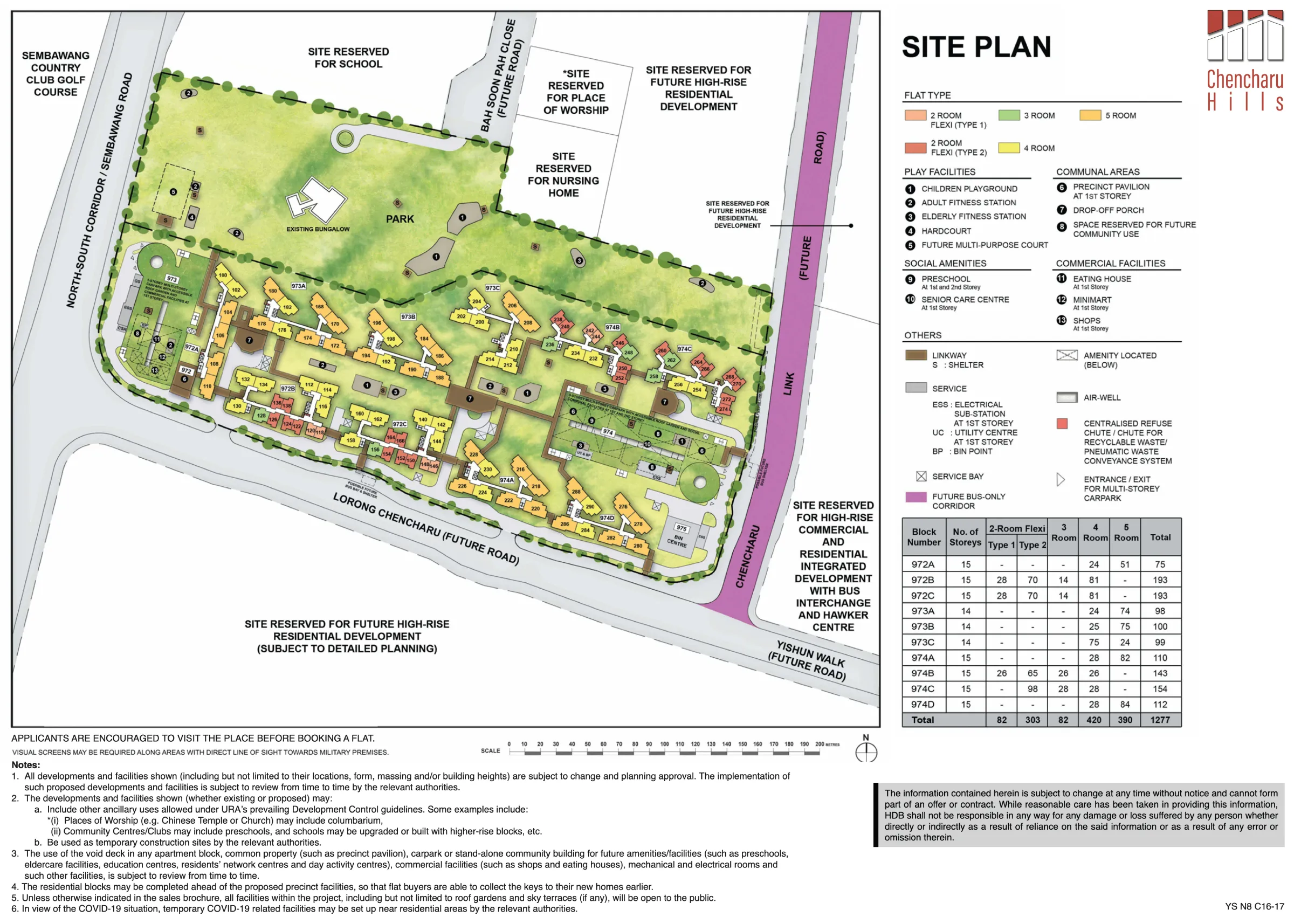
Your browser can't show 3D graphics, so here is the site plan instead.
- Rotate and tilt: hold Ctrl and drag, or right-drag. Sideways turns; up tilts towards the ground, down looks from above.in full screen , twist two fingers to turn, swipe two fingers up or down to tilt.
- Move: drag, like a map. A flick glides on.drag with one finger.
- Zoom: hold Ctrl and scroll (in full screen, just scroll).pinch with two fingers. Double click or tap zooms in. Lost? Tap reset .
Block outlines, windows (W1 three-quarter height or standard), view-blocking fins and screening are traced from HDB's sales brochure floor plans and placed using the site plan, at 2.8 m per storey. Roof water tanks follow the showroom model. Sun positions are calculated for Chencharu, Yishun, in Singapore time. It's a simplified model for a sense of layout and scale. Shapes, heights and surroundings are approximate and subject to HDB's final plans.